Your ad account is disabled or restricted
What Meta, Google and LinkedIn mean by a disabled, suspended, restricted or held ad account, what Mora shows, and who can ask for a review
On this page
What you see
A channel can stop a whole ad account. When it does, none of the account's campaigns can show until the channel lifts the stop.
- Meta calls it a disabled or restricted account. Meta Business Support Home lists it with What you can do next to it.
- Google calls it a suspended account (no ads can run, and the account is read-only apart from a few tasks such as payments and appeals) or a canceled account.
- LinkedIn puts the account On hold and shows a red banner in Campaign Manager with the reason.
If the cause is a failed charge, follow Your ads stopped because a payment failed instead.
What Mora shows
Mora reads each ad account's status with your results. When a channel reports a problem, a line appears at the top of Campaigns.
| Channel | Mora's line |
|---|---|
| Meta, disabled or closed | "Meta lists the ad account", then the account's name, then "as disabled, so none of its campaigns can show." Meta's status and reason follow in brackets, such as "(Meta: disabled; reason: ads integrity policy)". Chip: Account disabled. |
| Meta, under review | "Meta has flagged the ad account. (Meta: pending risk review) Check it in Ads Manager." |
| Google, suspended | "Google lists the account as suspended. Google says only Google support can reactivate it." Chip: Account disabled. |
| Google, canceled | "Google lists the account as canceled. Google says an administrator can reactivate it." Chip: Account disabled. |
| LinkedIn, held | "LinkedIn has flagged the ad account. (LinkedIn: restricted hold) Check it in Campaign Manager." |
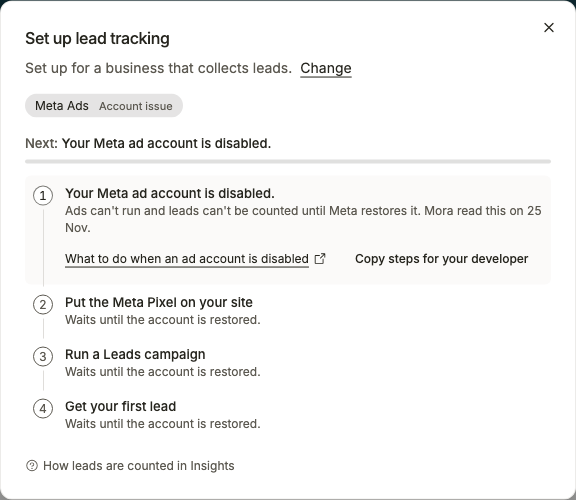
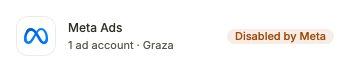
The words in brackets are the channel's own status. A campaign's Open in Ads Manager, Open in Google Ads or Open in Campaign Manager button takes you there. Mora does not change the account or ask for a review for you.
Mora also stops a save to a Meta or Google account that cannot run ads, with "This ad account isn't active with the provider. Check its status there, then choose Manage accounts here."
When you connect Google Ads, Mora lists only enabled customer accounts, so a suspended or canceled account does not appear. If it was your only one, Mora finds no Google Ads account to read.
Fix it on Meta
- On a computer, go to Meta Business Support Home.
- In Account Overview, select the restricted account.
- Under What you can do, take the steps Meta lists. Meta may ask you to confirm your identity, complete verification, secure your account or request a review.
Only an admin on the account can request a review. Meta says a review usually takes 48 hours and can take longer, and that you can request one only a limited number of times. If Meta decides the restriction should stay, it stays in place.
Meta can restrict an account when its ads severely or repeatedly break Meta's policies, and for other reasons such as unusual payment activity or a hacked account. How Meta reviews ads, and what to do when one is rejected, is in How to run Meta ads on Facebook and Instagram.
Fix it on Google
- Suspended: in Google Ads, select the Contact Us link in the notification at the top of the screen and send the appeal form that opens. Send one appeal at a time, and one for each suspended account. For a payment suspension, see Google Ads suspended your account for payment reasons.
- Canceled: an admin can reactivate it in Google Ads under Admin, then Preferences, then Account status, with Reactivate my account.
Google warns against making a new account to get around a suspension: it may suspend that one too.
Fix it on LinkedIn
The red banner in Campaign Manager names the hold; LinkedIn's list of holds gives the fix for each. Two common ones:
- A payment hold. Only the billing admin can update the card, as in the payment article linked above.
- A restricted member. LinkedIn holds the account when a member's profile looks spam or fake, often one set up under a company name. The member can fix their profile to meet LinkedIn's real-name rule, or an account manager can remove them: Account Settings, then Manage access, then the delete icon next to the member, then Remove. If that member is the billing admin, choose a new billing admin first.
LinkedIn says ads resume once the hold is removed.
Who to ask
The person who can act is usually an admin on the Meta or Google Ads account, or an account manager on the LinkedIn account. Send them the account name and the words in brackets from Mora's line.
Sources
Checked 25 Nov 2026.
- Troubleshoot a disabled or restricted account (Meta) (opens in a new tab)
- About advertising restrictions on Meta (opens in a new tab)
- Request a review if you are restricted from advertising on Meta platforms (opens in a new tab)
- Google Ads account suspensions overview (opens in a new tab)
- Reactivate a canceled Google Ads account (opens in a new tab)
- Reasons for LinkedIn Ads account holds (opens in a new tab)
- Manage restricted users in Campaign Manager (opens in a new tab)
Related
- Your ads stopped because a payment failed
- Google Ads suspended your account for payment reasons
- Connection says Needs attention: when the sign-in stopped working, not the ad account.
- What makes people click an ad: common reasons ads get rejected.
If the channel shows the account as active and Mora still shows the line, contact a person at Mora.