Your ads stopped because a payment failed
What Meta, Google and LinkedIn do when a charge fails, what Mora shows on Campaigns, and how the person who pays the ad bill fixes it
On this page
What you see
When Meta, Google or LinkedIn cannot charge the card or bank account on file, the channel stops showing your ads until the amount due is paid. Each channel says so in its own tool:
- Meta: Meta pauses your ads and disables the ad account until you pay the amount due.
- Google: Google Ads lists each declined payment under Billing, then Summary, with the date, the amount and the reason when there is one. Google says some accounts keep running for a short time after a decline, so your ads may not stop straight away.
- LinkedIn: Campaign Manager shows a red banner saying the account is On hold due to an issue processing your payment.
This is the channel's bill for ad spend, separate from your Mora plan. When Google and LinkedIn charge your card is explained in How to run Google Ads: a beginner's guide and How to run LinkedIn ads: a beginner's guide.
What Mora shows
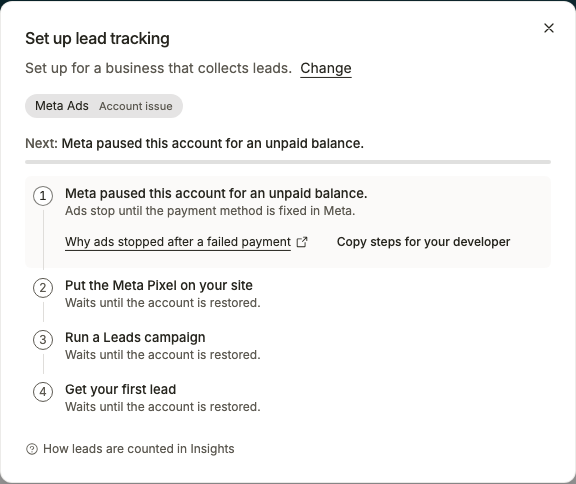
Mora reads each ad account's status with your results. A hold on the whole account prints a line at the top of Campaigns, and the account's campaigns carry a chip. A hold on every ad in one campaign shows on that campaign's row instead.
| Channel | Mora's line | Chip |
|---|---|---|
| Meta, account unsettled | "Meta lists the ad account as unsettled, so its campaigns can't show until the payment is sorted. (Meta: unsettled)" | Held for billing |
| Meta, account disabled | "Meta lists the ad account", then the account's name, then "as disabled, so none of its campaigns can show." Meta's status follows in brackets, with its reason when Meta gives one. | Account disabled |
| Meta, every ad held (campaign row) | "Meta lists every ad as pending billing info, so nothing can show until the payment is sorted." | Held for billing |
| "LinkedIn has put the ad account on a billing hold, so its campaigns can't show. LinkedIn still lists the account as active. (LinkedIn: billing hold)" | Held for billing | |
| No line. Google gives no field for a payment hold, so Mora cannot tell that a Google payment failed. | None |
On a campaign held for billing, Fix billing opens the campaign in Ads Manager or Campaign Manager, with the note "Mora has no direct link to the billing page, so look for billing there." Mora reads the status and opens the channel's tool. It does not pay the balance or change the payment method; the steps below happen in the channel.
Two Meta states look different. An account that is in its grace period, or whose payment is pending settlement, shows as "Meta has flagged the ad account" and carries no Held for billing chip, even though the cause is the payment. Treat it the same way: open Meta's billing page and settle the amount due.
If you try to save a new campaign to a Meta account that is unsettled or disabled, Mora stops and says "This ad account isn't active with the provider. Check its status there, then choose Manage accounts here."
Fix it on Meta
Someone who manages payments for the ad account does this in Meta.
- Go to Billing & payments.
- Select the ad account.
- Click Payment methods.
- Click Pay now.
- Choose a saved payment method or add a new one.
Meta says to try again later with a different card if the payment keeps failing. Once the balance is paid, your ads can run again. If they stay paused after you pay, Meta says you may have reached the daily spending limit Meta sets.
Fix it on Google
Google says your bank or card company declines a payment, not Google. If Summary gives no reason, call them first.
- In Google Ads, open Billing, then Settings.
- Under "Payment methods", select Fix it on the declined card.
- Check the details and select Retry, or select Use a different payment method.
- Review the outstanding balance and select Pay Now.
Google suggests adding a backup payment method. If Google paused or suspended the whole account over payments, follow Google Ads suspended your account for payment reasons instead.
Fix it on LinkedIn
Only the ad account's billing admin can add or update the card. If that person is not around, an account manager can make someone else the billing admin, who then adds the card again.
- Open the ad account in Campaign Manager.
- Click Billing in the left menu.
- On the Billing setup tab, click Update credit card under "How you'll pay".
- Enter the card and click Save and continue.
LinkedIn cannot see why a bank declined a charge, so ask the bank. LinkedIn says ads resume once the hold is removed.
Who to ask
If you did not set up the ad account's billing, send the account name to whoever did (on LinkedIn, the billing admin) and ask them to pay the amount due or update the card.
Sources
Checked 25 Nov 2026.
- Fix a failed payment issue on Meta (opens in a new tab)
- Resolve a declined payment in Google Ads (opens in a new tab)
- Resolve a declined payment: Credit cards (opens in a new tab)
- Remove hold status from a LinkedIn Ads account (opens in a new tab)
- Add or update your credit card information in Campaign Manager (opens in a new tab)
- Reasons for LinkedIn Ads account holds (opens in a new tab)
Related
- Your ad account is disabled or restricted: when the account is held for a reason other than a payment.
- Google Ads suspended your account for payment reasons: when Google pauses or suspends the account, not just one charge.
- Connection says Needs attention: when the problem is the sign-in, not the ad account.
- How much to spend on ads, and for how long: why one day can spend more than the daily budget.
If Mora still shows the account as held after the channel shows it paid, contact a person at Mora.