Why Leads says Not tracked yet in Insights
Why Leads reads Not tracked yet, and the steps in Set up lead tracking that let Mora count leads from Meta, Google and LinkedIn
On this page
What Not tracked yet means
On Insights, Leads reads Not tracked yet when no connected ad channel can count a lead in the window. Most often the money went on ads that cannot record a lead, such as link-click ads, and From ad click to lead says "These ads were not set up to record leads, so none are counted."
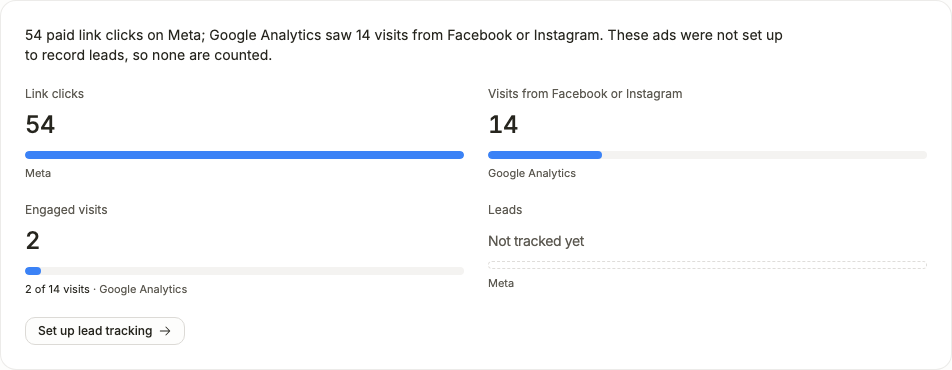
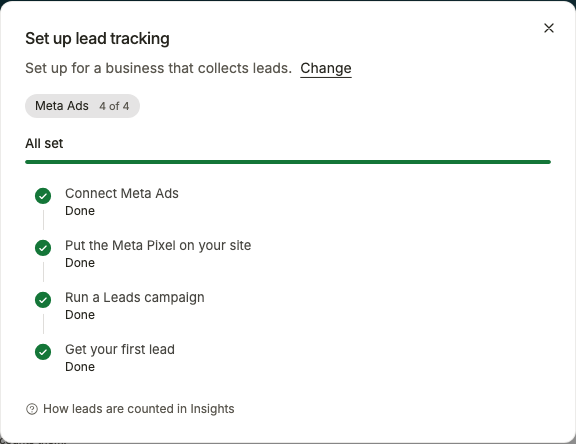
Select Set up lead tracking (or the Leads figure). The dialog has a tab for Meta Ads, Google Ads and LinkedIn Ads, each with a count such as "1 of 4", and names the next step. Steps Mora can see are ticked by themselves, and a step can also tick from what Mora reads elsewhere: the Pixel step ticks when your ad account has a Pixel and a Leads campaign has spent, or once a lead is counted; the Google tag step ticks only when the page check finds the tag or a lead is counted, so a conversion action alone does not tick it, and neither does a Google Analytics G- tag. Pressing Check on a finished step shows what it found under the buttons. Mora never changes your site or ad account for you.
Meta Ads
Connect Meta Ads
Connect the ad account in Connections and tick it.
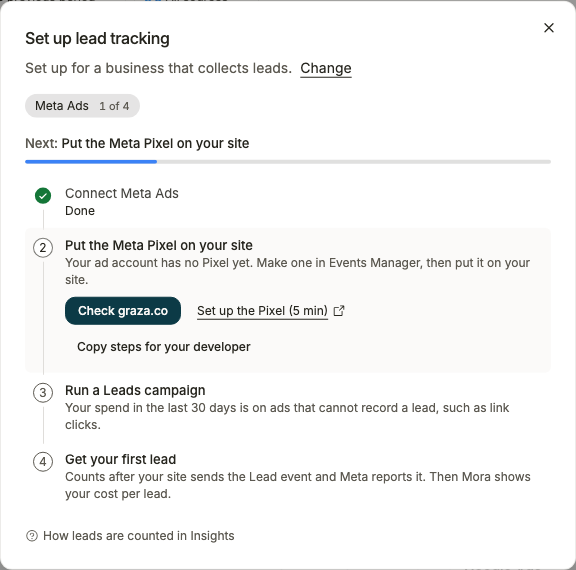
Put the Meta Pixel on your site
Make the Pixel, put it on every page, and have it send the Lead event when someone sends your form (Add the Meta pixel and check it fires).
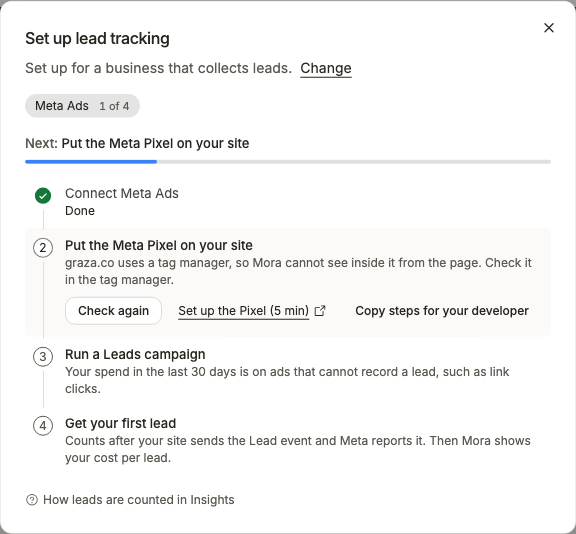
Check opens the page your Meta ad that spent most in the last 30 days sends people to, or your brand's website when there is no such ad, and says which it used. It reads that one page's source and looks for the Pixel ID, and the page may be a form host that is not your own site. You can run it 20 times an hour. "Not in the page source" is not proof the Pixel is missing: it may load through a tag manager or after a visitor accepts cookies. The check cannot see the Lead event fire, so test that with Test events in Events Manager.
The step also ticks when Meta reports that a Pixel on your ad account received an event recently. That shows events arrive; the Lead event still needs its own test.
Run a Leads campaign
Start a Leads campaign opens a new campaign in Mora with Leads picked. Mora's Meta Leads campaigns send people to your website and count the Pixel's Lead event. Mora does not make Meta instant-form campaigns. Whether Leads is the right goal: How to choose a campaign goal for your ads.
Get your first lead
The step is done once Meta reports a lead in the last 30 days, whatever dates the page is showing. So on a 7-day window Leads can read Not tracked yet while the dialog says All set: the lead was counted, but not inside the 7 days. Mora counts the leads Meta reports, including leads from forms on Facebook or Instagram in campaigns you run outside Mora.
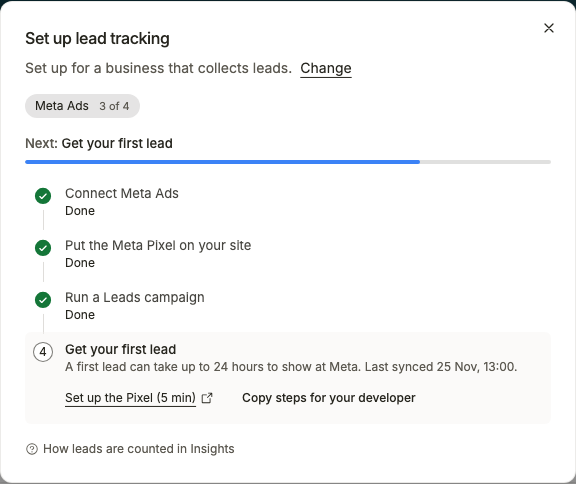
If a Leads campaign has spent and nothing shows, test that your form sends the Lead event.
Google Ads
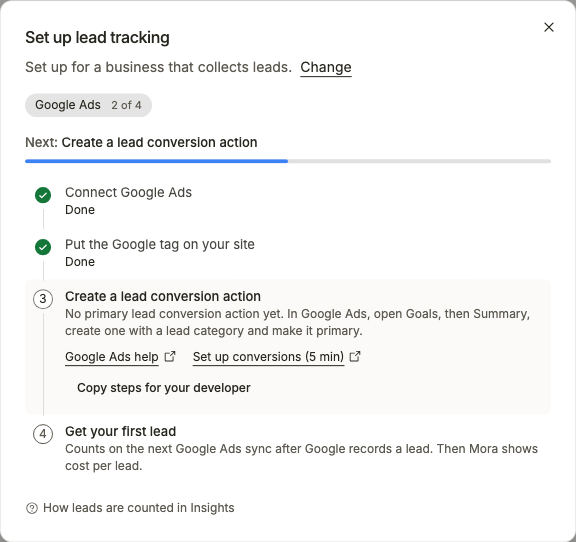
Put the Google tag on your site
After Connect Google Ads, put the Google tag on every page (Add the Google tag and set up conversions). The Check button works as it does for Meta: it reads one page's source, so a tag inside Google Tag Manager cannot be seen from it.
Create a lead conversion action
In Google Ads, open Goals, then Summary, and create a conversion action in a lead category, such as Submit lead form, Request quote, Book appointment or Contact. Make it Primary. Mora counts only primary actions in lead categories. Sign up is not counted as a lead.
Get your first lead
A lead counts on Mora's next Google Ads sync after Google records it.
LinkedIn Ads
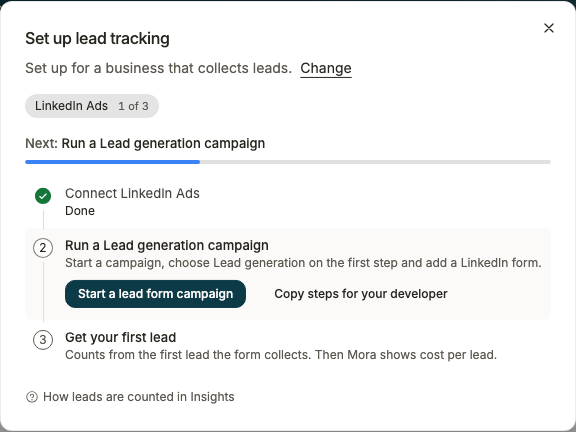
LinkedIn has no site check step: its Lead Gen Form opens on LinkedIn, so no tag on your site is needed for form leads.
Run a Lead generation campaign
After Connect LinkedIn Ads, build the campaign in Campaign Manager: choose Lead generation as the objective and attach a Lead Gen Form. LinkedIn says only an Account manager or Campaign manager can create the form. Start a lead form campaign opens a campaign in Mora, but a new workspace cannot save campaigns to LinkedIn yet (How do I turn on my LinkedIn campaign?).
Get your first lead
Mora counts the form leads LinkedIn reports, plus website conversions from the LinkedIn Insight Tag. Names and emails stay in Campaign Manager; Mora shows counts only.
When an account has a problem
If a connected ad account is disabled or held for payment, the tab badge reads Account issue. Step 1 becomes a sentence such as "Your Meta ad account is disabled. Ads can't run and leads can't be counted until Meta restores it.", and the later steps read "Waits until the account is restored." Fix the account first: Your ad account is disabled or restricted and Your ads stopped because a payment failed.
On the Connections page the account row can read Disabled by Meta (or Google, or LinkedIn), Payment held or Page not linked. A status read more than 2 days ago says when Mora last read it, for example "Disabled when Mora last read it on 23 Nov." For a Google account that Google has closed, Mora says "Google says this is permanent."
Other things the dialog can say
- Instant-form campaigns. When the campaign collects leads on the ad itself, step 2 becomes Collect leads on the ad and reads "No Pixel needed." Meta counts each form sent.
- After a Check. The result can say the form is on another host, that a cookie banner may hide the Pixel until a visitor accepts, that a tag manager may load it, that the site loads the Pixel through Shopify's Facebook and Instagram app, or that a different Pixel ID was found than the one on your ad account. None of these shows an event firing.
- While it runs. Check shows a loading state, and a failed check says so with Try again.
- Copy steps for your developer copies the steps as plain text to send to whoever edits your site.
- Waiting for the first lead. A first lead can take up to 24 hours to show at the channel. The step shows when Mora last synced. Before a lead arrives it reads "Counts once Meta reports a lead from your site. Then Mora shows cost per lead."
- An old reading. If the account had a problem when Mora last read it, step 1 is titled "Your Meta Ads account had a problem when Mora last read it." Check the account at the channel, then reopen the dialog.
- On Home. When money has gone on Meta in the last 30 days with no way to count a lead, a row on Home says so, for example "$X spent on Meta in the last 30 days with no way to count a lead." It has Set up lead tracking and Not now.
When every step is done
The tab reads All set and Get your first lead shows how many leads were counted. Cost per lead appears once at least 30 leads are counted in the window. Until then the tile reads Too early to read cost.
Google Analytics key events: not counted as a lead
A form-sent event marked as a key event in Google Analytics shows with your website figures, never as a lead. To count those leads, create a lead conversion action in Google Ads.
Sources
Checked 25 Nov 2026.
- Use the Meta event setup tool for web (opens in a new tab)
- Test events tool (opens in a new tab)
- Set up your web conversions (Google Ads) (opens in a new tab)
- About primary and secondary conversion actions (opens in a new tab)
- About updated conversion categories (opens in a new tab)
- Create LinkedIn lead generation ad sets (opens in a new tab)
- Mark events as key events (Google Analytics) (opens in a new tab)
Related
- Read your results in Insights: what the rest of the page shows.
- Check your tracking works before you spend: the checklist for every channel before a campaign spends.
- Connect your Meta ad account: the first step on the Meta Ads tab.
If a step stays open after you finish it, Contact a person at Mora.